
Graded Card LED Display Case
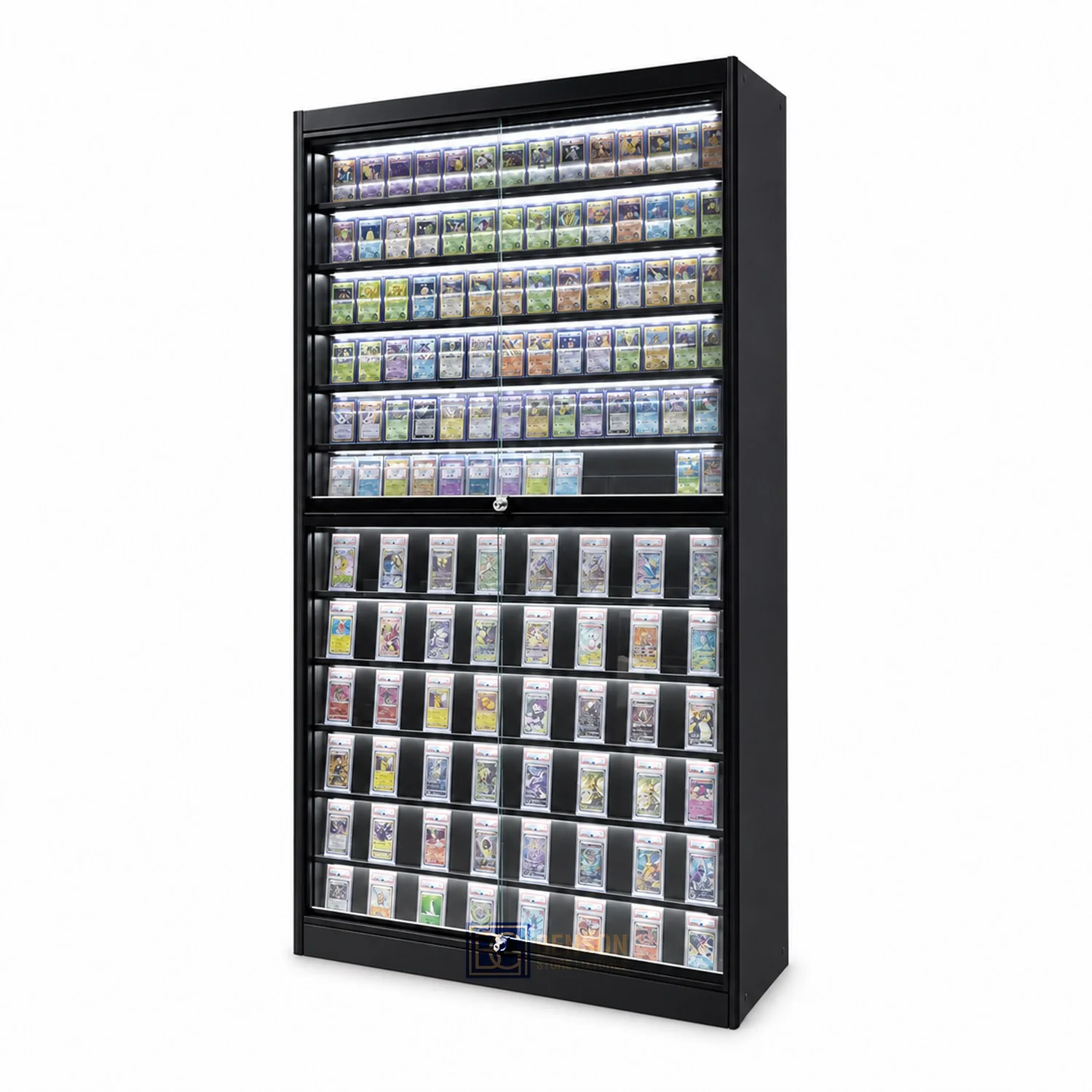
Graded Card LED Display Case: a focused buyer guide to merchandise fit, viewing, staff access, replenishment and cleaning, configuration checks and a comparable quotation brief.
- Published
- 2026-09-09
- Editorial check
- 2026-09-21
- Reading time
- 4 minutes

Editorial buyer guidance. Read our authorship and sourcing policy.
Start the graded card led display case brief with graded-card slabs, grading labels, oversize holders and display supports. Use the outside dimensions of each slab brand and verify that labels remain visible at every viewing height. Check the cabinet in the real operating sequence: viewing, staff access, replenishment and cleaning. State quantities, clear internal dimensions, selected options and destination in the quotation schedule.
This guide addresses a related search phrase. For the main topic overview, read the primary guide.
Plan with a Specific Cabinet Format.
Reference configurations for quotation planning. Dimensions are L × D × H in mm; inch values are converted. Final dimensions, materials and components are confirmed in the approved project drawings.
Trading Card Display Counter
1200 × 550 × 950 mm47.2 × 21.7 × 37.4 in- Suggested custom range (mm)
- L900–1500 / D500–600 / H900–1000
- Structure
- 18mm MDF with HPL or painted finish; recessed plinth
- Glass / panel
- 8mm tempered top; 6mm sides, subject to structural review
- Interior & access
- 1–2 adjustable glass shelves; optional inclined trays. Lockable rear sliding doors and lower storage.
- Lighting
- Dimmable 4000K LED in concealed aluminum channels
- Before approval
- Confirm holder fit, access and usable display height
Glass Island Card Showcase
1200 × 750 × 1000 mm47.2 × 29.5 × 39.4 in- Suggested custom range (mm)
- L1000–1800 / D700–900 / H950–1100
- Structure
- Aluminum or steel frame with 18mm panel base
- Glass / panel
- 6–8mm tempered glazing; review shelf spans
- Interior & access
- Central or double-sided inclined trays. Lockable access on one or two sides.
- Lighting
- Top perimeter LED with glare review
- Before approval
- Designate staff retrieval side in the store layout
Reference dimensions and configuration notes for quotation planning. All 24 proposed formats · Materials, holder fit and specification notes
Graded Card Cabinets: what to specify.
For graded card led display case, use the following requirements from the linked fixture system to make the next supplier discussion concrete. These are planning inputs, not tested performance ratings.
- Usable dimensions & holder fit
- Confirm overall width, depth and height separately from the clear interior. Provide holder width, height and thickness, any protective sleeve, orientation and removal clearance.
- Structure & daily access
- Review shelf adjustment, door travel, the actual opening, locks, lighting and service access. A glass side or matching finish does not establish the internal structure or included hardware.
- Capacity & reserve stock
- Record usable row width, holder dimensions, orientation, gap and usable rows. Label calculated quantities as estimates and review retention, labels and retrieval. Display quantity, reserve inventory and load are different measures.
- Included options & combination
- List the cabinet quantity and identify included, optional and excluded shelves, lighting, locks and storage. Confirm adjoining heights, end panels, connections, power and any future-addition record.
Three decisions for your fixture purchase.
- 01
Measure graded-card slabs, grading labels, oversize holders and display supports; do not size the cabinet from a catalogue name alone.
- 02
Use the outside dimensions of each slab brand and verify that labels remain visible at every viewing height.
- 03
Approve the arrangement only after checking viewing, staff access, replenishment and cleaning with the intended quantity in place.
Define the cabinet purchase: graded card led display case
Graded Card LED Display Case is a specific purchasing task, not a generic request for furniture. List graded-card slabs, grading labels, oversize holders and display supports, the number of selling positions and the reserve quantity. Mark retained fixtures, site constraints and work supplied by others. The resulting schedule should show exactly what this cabinet must accomplish during viewing, staff access, replenishment and cleaning.
- Measured merchandise or equipment dimensions
- Usable space and the required access route
- Cabinet quantity and configuration options
- Drawing, sample and quotation reference

Start with the actual requirement
Use the outside dimensions of each slab brand and verify that labels remain visible at every viewing height. Photograph representative items beside a scale, record their complete outside dimensions and note any packaging that must remain unmarked. Add label position, preferred orientation, handling frequency and the quantity displayed at one time. These inputs determine usable space more reliably than nominal product categories.
Primary references: PSA: holder and submission FAQs ↗ · Ultra PRO: trading-card toploaders ↗
Create a review record
Use the same merchandise and conditions throughout the review. Keep each measurement or decision linked to the specific fixture and drawing revision. Holder and surface finish — Record the actual value, condition or selected option. Identify any item that still needs confirmation. Cabinet light position — Record the actual value, condition or selected option. Identify any item that still needs confirmation. Room light direction — Record the actual value, condition or selected option. Identify any item that still needs confirmation. Viewing position and exposure — Record the actual value, condition or selected option. Identify any item that still needs confirmation..
- Measured merchandise or equipment dimensions

Work through the review
Walk through a normal transaction involving graded card led display case: customer identification, staff access where required, removal, return and replenishment. Repeat the check with neighboring positions occupied. Record collisions, hidden labels, awkward reaches and any movement that blocks the aisle or work surface.
Interpret the result correctly
Compare alternatives for graded card led display case against the same merchandise set and quantity. Score each option for visibility, access time, reserve storage, adjustment and the operating demands of viewing, staff access, replenishment and cleaning. Keep finish, delivery destination and included accessories constant so the comparison is about configuration rather than an incomplete quotation.
Bring the record into your quotation
Test the narrowest usable point, not only the largest internal dimension. For graded card led display case, check the opening, shelf edge, lock, support and adjacent item against graded-card slabs, grading labels, oversize holders and display supports. Confirm that the item can be inserted, identified and removed without bending packaging or disturbing the next position.
Prepare a representative fit and operation review
Build a representative bay for graded card led display case using the smallest, largest and most frequently handled items. Load neighboring positions and complete the viewing, staff access, replenishment and cleaning sequence. Photograph the accepted arrangement, record the drawing revision and list unresolved points separately; a styled image without those records is not an approval sample.
Catch this mismatch before ordering
The main mismatch to prevent is choosing graded card led display case from overall dimensions while ignoring usable access and merchandise variation. The unit may appear large enough yet conceal labels, restrict retrieval or waste capacity. Require a drawing or physical check that demonstrates the critical movement before release.
Turn the selection into a quotation brief
Give every graded card led display case unit a line number. Record quantity, overall size, clear working dimensions, shelf or support arrangement, access side, locks, lighting, storage and selected finish. Add packing state, destination access and assembly responsibility. Use that same revision for quotation comparison, inspection and any repeat order.
Record capacity as an arrangement with assumptions
Calculate capacity for the actual graded card led display case arrangement. Divide clear usable width by the measured item width plus the chosen handling gap, then verify the result physically at edges, locks and dividers. State orientation and usable row count. Treat the number as a planning estimate until access, loading and stability have been approved.
Apply the company process to this cabinet order
Connect the graded card led display case schedule to this company guide at the relevant approval step. Keep the merchandise record, current drawing, sample decision and responsible party together. The guide supports process control; the accepted cabinet configuration remains the project-specific reference.
Primary references: BENSON Materials & Finish Selection ↗
- Measured merchandise or equipment dimensions
- Usable space and the required access route
- Cabinet quantity and configuration options
- Drawing, sample and quotation reference
BENSON cabinet configuration: dimensions and fit
Use the BENSON configuration library to shortlist a starting arrangement for graded card led display case, then replace reference assumptions with graded-card slabs, grading labels, oversize holders and display supports. Record which library feature answers a real requirement and which dimensions or options still need confirmation.
Primary references: BENSON cabinet dimensions and configuration library ↗
Apply the configuration to your purchase
Apply the chosen reference to the available footprint and required quantity. Review viewing, staff access, replenishment and cleaning, then document clearances, access side, lighting, locks and reserve storage for graded card led display case. Remove options that do not solve a stated requirement instead of carrying them into the quotation by default.
Record the agreed BENSON configuration
File the approved graded card led display case reference with its drawing revision, quantity, dimensions, finish, hardware options and delivery notes. Add a photograph of the accepted merchandise arrangement so installation and future additions can be checked against the same baseline.
Translate the guidance into a specification check.
Use these parameters to record the actual merchandise, clear dimensions and configuration required for the cabinet quotation.
Compare one controlled basis.
How we apply this decision.
For graded card led display case, send BENSON the measured merchandise set, available footprint, unit quantity and the operating issue you need the cabinet to solve. Ask the proposal to identify assumptions and exclusions, then close each open point on the drawing or sample record.
Review BENSON capabilities →What still needs configuration confirmation.
This graded card led display case guide is a purchasing framework, not a fixed product specification. Final capacity, loading, materials, electrical components, compliance responsibilities, packing, price and delivery timing depend on the approved project documents.
Prepare the required inputs →Avoid these shortcuts.
- Treating a reference image as an approved production specification.
- Comparing suppliers without identical dimensions, quantities and delivery scope.
- Separating material, lighting or hardware decisions from the drawing revision.
- Leaving packing, local installation and site interfaces undefined.
Before the next approval.
- Measure graded-card slabs, grading labels, oversize holders and display supports; do not size the cabinet from a catalogue name alone.
- Use the outside dimensions of each slab brand and verify that labels remain visible at every viewing height.
- Approve the arrangement only after checking viewing, staff access, replenishment and cleaning with the intended quantity in place.
- Record each open point, owner, due date and required evidence.
Answers to the next practical questions.
01What information is needed to specify graded card led display case?+
Provide graded-card slabs, grading labels, oversize holders and display supports, quantities, available dimensions and photographs of the site. Use the outside dimensions of each slab brand and verify that labels remain visible at every viewing height.
02How should a graded card led display case option be tested?+
Load a representative section and complete viewing, staff access, replenishment and cleaning. Record clearances, label visibility, access time and replenishment steps against the current drawing.
03Does this guide fix the capacity or price of graded card led display case?+
No. Capacity follows the approved arrangement and measured items; price follows quantity, construction, options, packing and delivery scope stated in the quotation.
Trace the supporting information.
PSA: holder and submission FAQs ↗Primary reference for PSA holder and submission context. Check the actual holder used in your project; this is not a cabinet fit certification.
Ultra PRO: trading-card toploaders ↗Manufacturer reference for protective-holder formats. Cabinet clearance is measured from the complete holder and sleeve.
BENSON project preparation tools ↗Our project input framework; not an independent performance test.
Authorship and sourcing policy ↗How this guide was created, checked and maintained.
Company and fixture reference library ↗Company Process Reference.xlsx · Company Process Reference!A289:A313; Website Copy Reference.xlsx · Customization!A44:A61; Editorial adaptation for this guide.
Content review policyGuidance published 2026-09-09. Editorial check: 2026-09-21. Project engineering approval and physical testing are separate.
Move from research to a fixture specification.
Keep building the specification.

Internal Dimensions for Graded Card Displays
Size a graded card display from the complete holder and the movement needed to remove it. Record sleeved width, height, thickness, clear row width, retaining-edge position and door opening separately. A cabinet can accommodate the resting slab yet prevent it from being lifted out. Approve a loaded sample row before treating the calculated capacity as an order requirement.
Read next →
Graded Card Display Case
Start the graded card display case brief with graded-card slabs, grading labels, oversize holders and display supports. Use the outside dimensions of each slab brand and verify that labels remain visible at every viewing height. Check the cabinet in the real operating sequence: viewing, staff access, replenishment and cleaning. State quantities, clear internal dimensions, selected options and destination in the quotation schedule.
Read next →
PSA Card Display Case
Define psa card display case around graded-card slabs, grading labels, oversize holders and display supports. Use the outside dimensions of each slab brand and verify that labels remain visible at every viewing height. Check the cabinet in the real operating sequence: viewing, staff access, replenishment and cleaning. State quantities, clear internal dimensions, selected options and destination in the quotation schedule.
Read next →Request a configuration for your next fixture order.
Send available dimensions, card-holder or package sizes, cabinet quantities, destination and required options. BENSON can review a specific configuration and quotation scope.
Request a Fixture Quote